PA behavioral health audits often come down to one question: does your chart back up your claim?
In Pennsylvania, BH-MCOs typically review both the service record and the claim together, so the focus should be on four things first: current charts, claim-to-note matching, routine internal reviews, and staff follow-up.
Four priorities for audit-ready records:
- Keep charts current: diagnoses, treatment plans, consents, and prior auths should all be up to date
- Match each billed line to the record: codes, modifiers, units, place of service, and time entries should line up
- Review records on a set schedule: monthly or quarterly file checks can catch gaps before a payer does
- Watch common risk areas: telehealth, prior-auth services, staff clearances, and incident reporting
- Train staff after each review: fix repeat charting and billing issues at the process level, not just in one file
A few facts stand out:
- Staff clearances in PA must be renewed every 5 years
- Serious incidents may need reporting within 24 hours
- Time-based services should show start and stop times, not just total minutes
The takeaway: audit prep is less about scrambling after a notice arrives and more about making sure each record can stand on its own every day.
The rest of the article walks through those steps in a simple order: documentation first, billing second, internal review third, and staff process changes last.
Build Audit-Ready Documentation
When a BH-MCO reviews a chart, it needs a clear record that backs up the service billed. If documentation is missing, old, or hard to follow, the claim may be at risk.
Keep Assessments, Treatment Plans, and Consents Current
At a minimum, make sure the diagnosis connects to the billed service, the treatment plan is signed and current, consents are on file, and prior authorizations are still valid. The treatment plan should be specific, based on goals, and lined up with the interventions shown in progress notes.
Track authorization end dates and renew them before they expire. An expired authorization can lead to denials and recoupment of paid claims.
Once the chart is up to date, the next thing an auditor checks is simple: does the claim match the record?
Write Progress Notes That Support Medical Necessity
Each note should explain why the service was medically necessary that day, what intervention was provided, how the client responded, and how the session connected to a treatment goal.
Vague wording doesn’t show what happened or why the service was needed. The note itself has to make medical necessity clear.
Prevent High-Risk Charting Problems Before They Spread
High-risk issues include missing signatures, old treatment plans, and notes that don’t match the billed service.
A simple spot-check process can catch problems early. Have one reviewer check charts for:
Then confirm that the billing code matches the chart.
Match Billing Codes to the Record
Once the documentation is in place, the next step is simple: match every billed line to the medical record. Each claim line should have a chart note that backs up the exact service billed.
If a service shows up on the claim, you should be able to find it in the record without hunting for it.
Check Codes, Modifiers, Units, and Place of Service
The billed CPT or HCPCS code should match what’s written in the chart. The same goes for modifiers and units. They need to fit both the documented service and the payer’s rules.
The record should also show the place of service code used on the claim. That way, the billed line ties back to the note clearly, with no guesswork.
Verify That Time-Based Services Are Fully Documented
Time-based services need tighter support. The progress note should include the date of service along with start and stop times.
Use start and stop times, not just total duration. That detail matters when the service is billed based on time.
Billing Risk Areas and Required Chart Support
Billing Scenario | Required Chart Support |
|---|
Time-based services | Date of service, start and stop times, the specific CPT or HCPCS code, and place of service code |
If a billed line can’t be traced to a chart entry, it’s at risk. These checks help catch problems before internal review.
Run Internal Audits and Prepare for Requests
Once the chart and claim line up, internal audits help you catch problems before the payer does.
Run them monthly or quarterly to spot chart gaps before a BH-MCO reviews the file. Each cycle, pull a random sample of records and score them with a standard checklist. Then document what you found, assign follow-up steps, and review any high-risk areas again in the next cycle.
Put extra attention on:
Track PA State Police, FBI, and Child Abuse clearances separately, and renew them every five years [1]. Don’t wait until they lapse. Renew them before the expiration date.
Organize Records for Desk and On-Site Audits
When an audit notice comes in, confirm the audit period right away. Then gather the requested records and keep a log of what you sent, when you sent it, and who received it.
Requirements can differ by BH-MCO, so keep a plan-by-plan log for each contracted BH-MCO [1]. That small step can save a lot of back-and-forth later.
Common Audit Findings, Risk Level, and the Fix
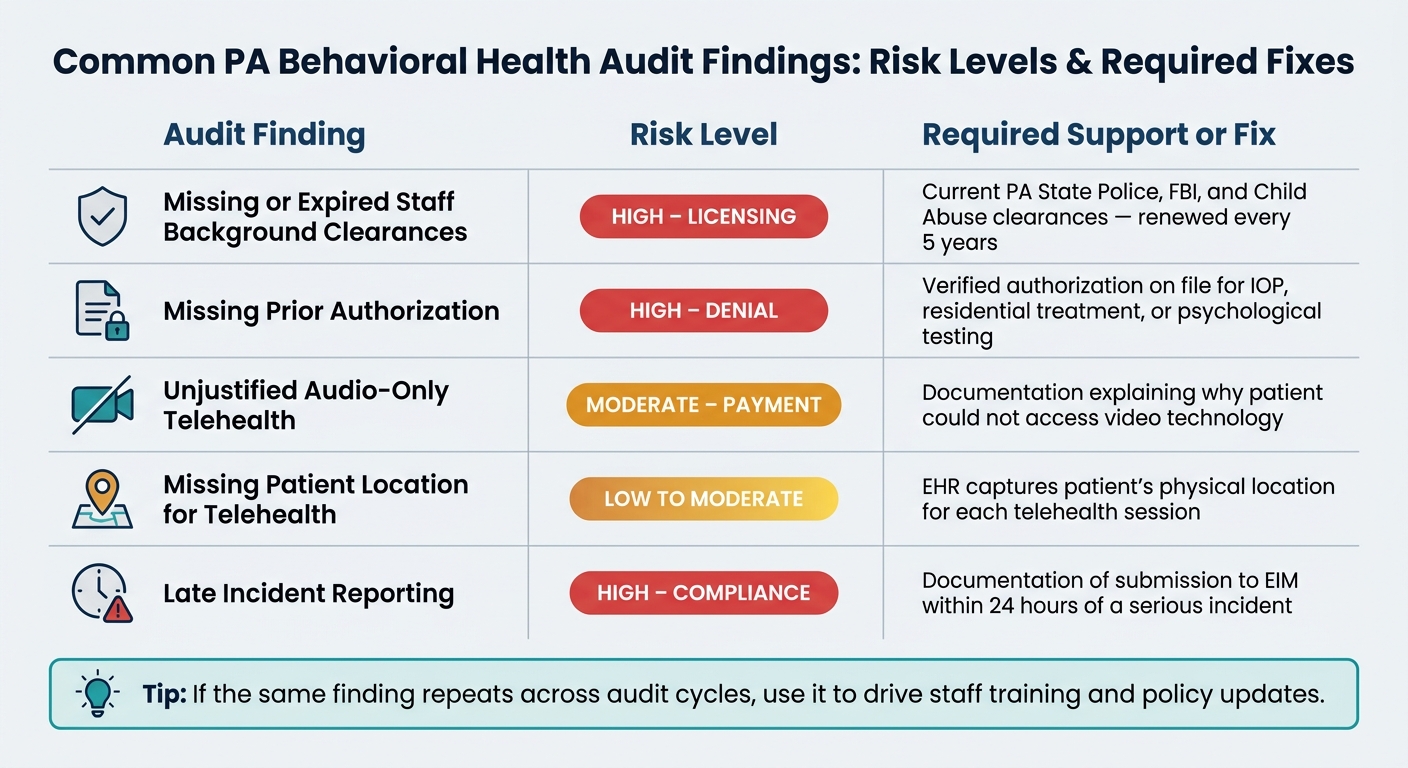
The table below shows common findings in Pennsylvania behavioral health audits and the chart support that helps deal with them [1].
Common Audit Finding | Risk Level | Required Support / Fix |
|---|
Missing or expired staff background clearances | High (Licensing) | Current PA State Police, FBI, and Child Abuse clearances, renewed every 5 years |
Missing prior authorization | High (Denial) | Verified authorization on file for IOP, residential treatment, or psychological testing |
Unjustified audio-only telehealth | Moderate (Payment) | Documentation explaining why the patient could not access video technology |
Missing patient location for telehealth | Low to moderate | EHR captures the patient’s physical location for each telehealth session |
Late incident reporting | High (Compliance) | Documentation of submission to EIM within 24 hours of a serious incident |
If the same finding keeps showing up, use that pattern to guide staff training and policy updates.
Stay Prepared With Training, Policy Updates, and RCM Support
Turn Audit Findings Into Staff Training and Policy Changes
After each internal audit, turn repeat mistakes into staff training and workflow changes. Don’t just fix the chart in front of you. Fix the process that led to the mistake in the first place.
Once an audit cycle wraps up, set up a refresher session for clinicians, billers, and supervisors. Zero in on the patterns that showed up again and again: weak medical necessity language, missing start and stop times on time-based codes, unsigned treatment plans, and CPT codes that don’t match the note.
Then update your note templates so they prompt staff for the items that must be there, such as:
Measurable goals
Time documentation
Required signatures
For provisionally licensed staff, a signature checklist can help a lot. Use it to make sure treatment plans are co-signed by the supervising clinician and by the patient or guardian when required before the chart is finalized. Small workflow fixes like this help keep the same findings from popping up again. From there, build those same rules into billing checks so mistakes get stopped at the source.
Use Compliance-Focused RCM Workflows to Reduce Avoidable Risk
Training helps staff spot mistakes. But billing workflows need to catch those mistakes before claims are sent.
Pennsylvania’s county-based HealthChoices model adds another layer here. BH-MCO rules can vary based on authorization, filing deadline, and rate. A generic billing workflow often misses those plan-specific rules.
BHRev supports behavioral health RCM with:
Conclusion: Core Steps That Make Audits Easier to Manage
Audit readiness comes down to a few core habits: complete documentation, clean claim-to-chart matching, routine internal audits, and steady staff training.
FAQs
What documents are most likely to trigger audit risk?
Audit risk usually starts with one thing: missing, incomplete, or inaccurate documentation.
That’s the stuff auditors spot first.
Common red flags include:
Missing progress notes, treatment plans, or encounter forms
Identical or copied session notes
Notes that don’t include enough detail to back up service time
Missing start and end times, wrong place-of-service codes, or missing practitioner signatures
How often should we run internal behavioral health chart audits?
Pennsylvania behavioral health providers need a Claims Auditing Policy that clearly spells out how often internal audits take place.
There isn’t one required schedule that applies to everyone. But the policy does need to state:
That means the key issue isn’t picking a state-mandated interval. It’s making sure your policy is clear, specific, and followed in practice.
What should a Pennsylvania telehealth note include for audit support?
For Pennsylvania telehealth audit support, the note needs to show how the session was delivered and confirm that it met state rules.
Include:
The delivery method, such as video or phone
The telehealth platform used
The member’s phone number, if the session was done by phone
A formal assessment stating whether the individual was clinically appropriate for telehealth
This should be written clearly in the note so an auditor can see that the visit met regulatory requirements.