
Home / RCM Outsourcing Checklist for Scaling Behavioral Health

Behavioral health billing outsourcing can improve collections, reduce administrative workload, and provide access to specialized revenue cycle expertise.
However, the results depend heavily on selecting a vendor that understands behavioral health reimbursement, payer requirements, and the operational needs of the organization.
So before outsourcing, determine whether the organization needs full-service revenue cycle management (RCM) or targeted support for a specific billing function.
Behavioral health denial rates can reach approximately 15%–18%, while strong billing operations often target denial rates below 5%. Aging A/R is another important measure of revenue cycle performance. Claims that remain unpaid for more than 90 days generally become more difficult to collect.
The appropriate outsourcing model depends on where problems occur in the revenue cycle. Full-service RCM is generally better suited to organizations experiencing problems across multiple functions, including eligibility verification, prior authorization, claim submission, denial management, payment posting, and A/R follow-up.
Targeted billing support may be more appropriate when performance issues are concentrated in one or two areas, such as denial management, prior authorization, appeals, or aging A/R. Defining these gaps before selecting a vendor helps establish the appropriate scope of work, performance expectations, and accountability.
Option | Best Fit | What I’d Check First |
|---|---|---|
Full-service outsourcing | I have several billing problems at once, staff shortages, or growth plans | Payer coverage, full workflow ownership, EHR fit, SLA terms |
Targeted support | I have one main issue, like denials or aged A/R | Scope limits, reporting, handoff rules, pricing |
If you want fewer billing issues and less confusion later, use the checklist to test each vendor step by step before signing.
Start by confirming behavioral health billing experience. If a vendor can’t handle payer rules at your current volume, growth gets harder fast. This part should help you see whether the vendor can work with your payer mix without piling up denials you could have avoided.
Vendors that lack hands-on experience with core behavioral health codes, like psychiatric evaluation, psychotherapy, and ABA codes, tend to run into trouble early.
For Medicaid, state-level knowledge is a must. Check that the vendor understands state-specific Medicaid rules, MCO carve-ins, and filing limits. For Medicare, make sure they can manage coordination of benefits (COB) and secondary claims, not just primary claim submission.
You should also confirm support for IOP, PHP, and MAT billing. These services come with specific prior authorization steps and documentation rules that many general RCM vendors miss.
Billing Area | What to Confirm With the Vendor |
|---|---|
Medicaid | State-specific rules, MCO carve-ins, filing limits |
Medicare | COB handling, secondary claims |
IOP / PHP / MAT | Prior authorization workflows, level-of-care documentation |
Commercial payers | Mental Health Parity (MHPAEA) compliance, payer-specific edits |
Substance use disorder | ASAM level coding, HN/HO/HP modifier accuracy |
Credentialing gaps are one of the most common reasons claims get denied. Your vendor should actively manage provider enrollment status, CAQH attestation, NPI accuracy, and payer panel tracking for every provider type you bill for, including BCBAs, RBTs, NPs, and PAs.
Credentialing is only part of it. Every claim should be scrubbed before submission against payer-specific edits so coding mistakes and missing modifiers are caught early. Real-time eligibility checks and claim scrubbing can help stop front-end denials before they start.
Ask the vendor to walk you through how they track annual code and modifier updates. If they can’t explain that process in plain English, that’s a warning sign worth noting before you sign anything.
Once payer rules and enrollment are covered, the next thing to check is how the vendor handles denials and A/R recovery.
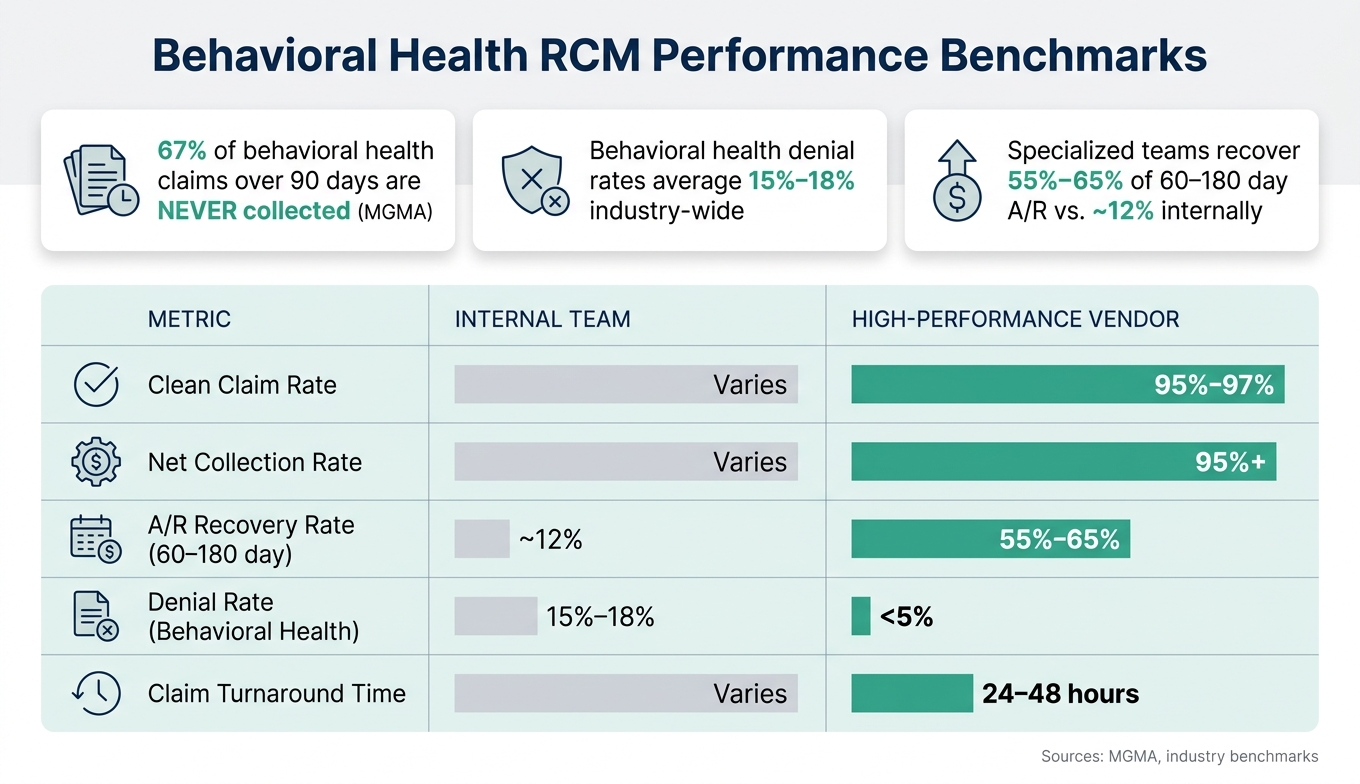
After payer rules and enrollment, the next step is simple: look at how the vendor works denials and how well they recover aged A/R.
Start with the vendor’s denial categorization system. You want a team that tracks denials by root cause – authorization gaps, eligibility errors, coding issues, and missing modifiers. That’s how you spot the pattern behind the problem instead of patching the same issue over and over.
Escalation paths matter just as much as resubmission speed. Some appeals need clinical documentation or direct provider input. If that handoff is messy, claims sit. Ask who owns each escalated appeal, how fast it’s supposed to move, and how the final result is tracked. Also ask for the appeal win rate and overturn rate in writing.
Require reporting on the numbers that show whether recovery work is doing its job:
Clean claim rate
Denial rate
Days in A/R
Appeal win rate
Aged A/R by bucket, with close attention to claims in the 60–180+ day range
That aging window is where collection gets much harder. According to the Medical Group Management Association (MGMA), 67% of behavioral health claims over 90 days are never collected and are often written off. Specialized recovery teams, by contrast, achieve 55%–65% recovery rates on claims in the 60–180 day range, compared with about 12% when internal staff handle them without dedicated bandwidth. [10]
Metric | Internal Team Benchmark | High-Performance Target |
|---|---|---|
Clean Claim Rate | Varies | 95%–97% [10] |
Net Collection Rate | Varies | 95%+ [9] |
Recovery Rate (60–180 day A/R) | ~12% [10] | 55%–65% [10] |
Denial Rate (Behavioral Health) | 15%–18% (regional avg.) [10] | <5% [10] |
Claim Turnaround Time | Varies | 24–48 hours [9] |
You should also ask for payer-specific aging reports, provider or service-line denial trends, and a month-end review cadence.
Once recovery performance is clear, verify EHR connectivity and workflow fit.
After denial recovery, the next step is simple: make sure the vendor can actually function inside your current systems without leaving your team to clean up the mess by hand.
A poor EHR fit leads to data gaps, duplicate entry, and claims delays. Before you sign, confirm that the partner can work within your current setup – or provide its own platform – without piling on manual tasks.
The best setups automate routine RCM work, including eligibility verification, claim scrubbing, and payment posting, while staff step in for exceptions and harder compliance issues [3][5].
Here are the integration points to check:
Real-time eligibility verification before each appointment
Automated claim scrubbing that catches errors before submission
Clinical documentation flow into billing without duplicate data entry
Payment posting that matches insurance and patient payments to submitted claims
Prior authorization tracking that both clinical and billing teams can see
API availability so the partner’s system can exchange data with your EHR or practice management software
If even one of these links breaks, your reporting will have holes.
Ask a direct question: does the partner integrate with your current EHR, or does it offer a platform that cuts manual work?
It also helps to spell out ownership across teams. Clinical staff handle documentation. Front-desk staff handle registration and demographic collection. Eligibility verification and prior authorization are shared. The RCM partner handles coding, claim submission, payment posting, and A/R follow-up.
You’ll want a secure portal or real-time dashboard so your team can check performance between review meetings. If no one can see claim status, aging, and denials in between reviews, things tend to drift.
Use this reporting matrix to keep the vendor on the hook after implementation:
Reporting Category | Frequency | Owner |
|---|---|---|
Eligibility Verification | Daily (pre-visit) | Shared – Staff & RCM Partner |
Claim Scrubbing & Submission | Daily | Outsourced RCM |
Denial Analysis & Work Queues | Real-time/Weekly | Outsourced RCM |
A/R Aging (by payer and bucket) | Weekly/Monthly | Outsourced RCM |
Payment Posting & Reconciliation | Daily/Weekly | Outsourced RCM |
Financial KPI Review | Monthly | Leadership & RCM Partner |
Provider Productivity by Service Line | Monthly | Leadership & RCM Partner |
Use monthly reviews to confirm trends and assign fixes. If a partner can’t show root-cause analytics for billing errors and revenue leakage, that’s a gap worth flagging before you sign [6].
Next, lock these requirements into the contract so reporting, access, and ownership stay enforceable as you scale.
Once reporting is in place, use the contract to lock down scope, access, and room to grow. The point isn’t just to document expectations. It’s to make those reporting standards enforceable.
Before you sign, define the scope in writing: full RCM or claims-only support. Make sure the contract spells out which modules are included and which come with extra fees.
Pricing usually follows one of two models: a percentage of collections or a fixed per-FTE fee. Ask about add-on charges for IT, setup, or transition support now, not later. That’s how you avoid the kind of surprise invoice nobody wants.
The table below covers the core contract terms to confirm before signing:
Contract Term | What to Confirm |
|---|---|
Scope of Services | End-to-end vs. modular support; excluded services listed explicitly [1][7] |
Pricing | Percentage-based or fixed per-FTE fee, with no hidden IT, setup, or transition fees [4] |
Implementation Timeline | Contracted milestones for onboarding, integration, and go-live dates [4][7] |
Data Ownership & Security | HIPAA compliance, ISO 27001 or SOC 2 Type I, encrypted storage, and audit trails [4][8] |
Performance (SLAs) | Clean claim rate, denial rate, days in A/R, and write-off limits in writing [4][8] |
Termination Rights | No long-term lock-in and a 30-day notice period [4] |
Transition Support | Transition protection terms and a structured onboarding plan to protect cash flow [2] |
If a vendor won’t commit to SLA targets in writing, take that as a warning sign. Top-tier partners often target a clean claim rate of 97% to 98% and write-off limits below 1% [4][8].
Put growth triggers into the contract: new providers, new locations, and new service lines. Growth can change billing volume fast, and the contract should account for that. Include provider enrollment, location updates, and service-line expansion up front.
Before signing, ask the partner to walk you through each growth scenario. You want clear answers on whether they can handle credentialing for new providers, update payer enrollment across locations, and adjust workflows when new service lines come online.
Use this checklist as your final sign-off:
Behavioral health payer coverage: Medicaid, Medicare, and commercial payers supported, with specialty-specific billing rules
Denial management: Active appeal workflows, root-cause tracking, and resubmission timelines in writing
A/R recovery reporting: Regular claims aging, collection, and denial trend reports, plus clear performance targets
EHR connectivity: Real-time eligibility, claim scrubbing, and visibility into claims and financial reporting
Contract clarity: No hidden fees, defined SLAs, HIPAA and security requirements, and a 30-day exit option
Scalability: Credentialing support for new providers, payer enrollment for new locations, and service line expansion without disrupting cash flow
If a partner checks every box, you’re in a much better spot to grow without billing chaos. If there are gaps, those gaps usually show up later as denied claims, slow reimbursements, or a transition that becomes far harder to fix than it should be.
Choose full-service RCM if you’re dealing with bigger issues like rising denials, tougher compliance demands, staffing gaps, or shaky cash flow. It handles the entire revenue cycle, which lets your team spend less time on billing work and more time on patient care.
Choose targeted support if your main problem is a specific bottleneck, such as denied claims or prior authorizations, and you want to keep the rest of your billing functions in-house.
Ask for clear, regular reports that show how reimbursement is performing and where operations may be slipping. That should include:
revenue summaries
claims and A/R aging
collection and denial trends
payment turnaround times
provider productivity
When you review SLAs, look for dedicated account management and reporting that gives your leadership team usable insight for better financial decisions.
Assess whether the partner handles the full revenue cycle, not just claim submission.
That means looking beyond the basics. A good partner should use modern tools for:
eligibility verification
claim scrubbing
denial management
Why does that matter? Because billing problems usually don’t start at claim submission. They start earlier, with eligibility issues, missing details, or payer-specific errors that slow everything down.
You’ll also want clear monthly reporting, a dedicated account manager, and deep behavioral health knowledge. That kind of subject-matter know-how helps the team deal with payer rules and documentation demands without turning billing into a traffic jam.
One email a month, no fluff. Unsubscribe anytime.